Project Summary
This was a team project where I was responsible for the UX, UI, and prototype for the Irvine Water District (IRWD) EV charging app. The project arose from the need to improve communication and coordination among IRWD employees due to a limited number of EV chargers, often leading to EV drivers not charging their vehicles when needed. The goal was to develop a multi-platform mobile app exclusively for IRWD employees to enhance EV charging coordination and communication.
The user research data helped me identify key issues, questions, user behaviors, and pain points, which informed the development of the following crowdsourced systems:
- EV Check-In and Check-Out System: Allows drivers to communicate their charging status effectively.
- EV Charger Request System: Enables drivers to request a parking spot, facilitating better EV charging coordination.
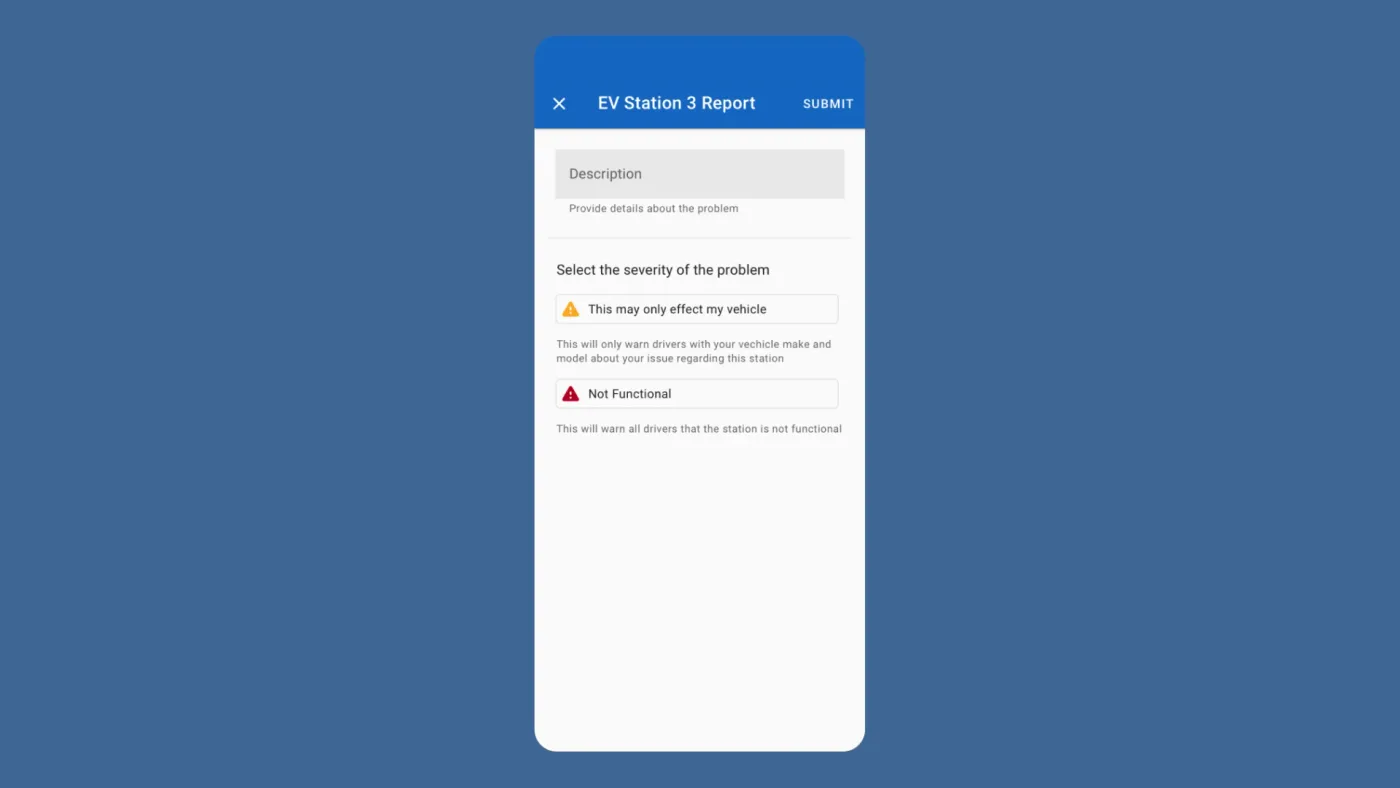
- Reporting System: Allows drivers to report technical issues and unauthorized parking at EV chargers.
- EV Charging Information and Status Updates: Provides drivers with real-time information about the charging status of the chargers in use.
Problem Statment
RWD employees struggle to charge their cars at work due to limited EV charging stations, leading to communication and coordination hassles.
The lack of sufficient EV chargers at the IRWD campus has resulted in several coordination and communication issues for EV charging:
Issues
- Unmet Charging Needs: Drivers are unable to charge their cars when needed, leading to inconvenience and issues coordinating EV parking with their peers.
- Coordination Challenges: Due to poor communication, co-workers resort to coordinating EV charging during their lunch break.
- EV Charging Reminders: Drivers need to remind other EV owners to move their cars once charging is complete.
- Securing a Spot: Employees arrive at work earlier than necessary to secure a charging spot.
- Reliance on Third-Party Chargers: Drivers resort to using third-party EV chargers outside of work, which can be inconvenient and costly.
My Roles & Design Process
I was the solo product designer responsible for the UX, UI, prototyping, and secondary research. The research team was responsible for conducting the main research for the project.
User Experience Research (UXR)
- Secondary Research: Visited the IRWD parking structure to analyze the parking and EV chargers, gathering key information to inform the product design.
- Product Analysis: Analyzed competing products to gather insights and feature inspiration for ideating sketches
User Experience Design (UX)
- Sketches: Utilized research insights to brainstorm and sketch systems targeting the common pain points of participants.
- Wireframing: Converted the sketches into medium-fidelity designs, outlining the product's structure, layout, and functionality.
User Interface Design (UI)
- High-Fidelity Design: Refined the wireframes to create a polished high-fidelity user interface design in preparation for the prototype.
- Design System: Applied the Material Design System as a foundation for creating the high-fidelity design and UI components.
Prototyping
- Prototype: Developed a high-fidelity prototype defining the major systems for facilitating EV charging coordination, in preparation for user testing.
Usability Testing
- Usability Test: Prepared a list of tasks to analyze, observe, and test how users interact with the four major systems to address EV parking-related issues.
Targeted Demographic
The targeted demographic consists of all 12 IRWD employees who own electric vehicles (EVs) and charge their cars at the IRWD campus.
Scope and Constraints
Exclusive for IRWD employees, no external hardware allowed, no third-party apps, and no EV charger API access.
Constraints
The following constraints were present during this project:
- Exclusive IRWD Access: The product must be private and exclusive to IRWD employees.
- No External Hardware: The solution could not involve any external hardware.
- No EV Charger API Access: Due to the rudimentary nature of the EV chargers, API access was not available.
- Limited User Research Involvement: I did not participate in conducting the main user research.
Platform
iOS and Android.
User Experience Research (UXR)
Research Objectives
The research objectives of this case study focused on understanding EV charging coordination hurdles and inconveniences, leading to the following research questions:
- Post-Charging Actions: What does a driver do when their car is fully charged and occupying a charging space?
- Coordination Methods: Do drivers coordinate EV charging among their peers? If so, how do they do it?
- Unavailability Solutions: What do drivers do when they need to charge their car but cannot find an available charging station?
- Primary Charging Issues: What is the main cause of drivers not charging their cars?
- Immediate Charging Needs: Do drivers need to charge their cars immediately upon arriving at work?
- Availability Frequency: How often do they find an available charging station at IRWD?
Research Methods
Surveys and user interviews were the primary methods for answering the research questions. The user interviews provided the majority of information and insights. While I was not in charge of the user research, I did help generate and refine user interview questions and did my best to work with the research data given to me. Any questions or assumptions outside the scope of the study resulted in a cross-functional collaboration with the researcher to clarify, improve, and conduct secondary research to complement the main research.
Research Considerations
For the research, instead of conducting surveys or interviews, I would have opted for contextual inquiries because we had direct access to the participants and the facility, conducting the research in person could have generated more accurate observations and insights. Another good option would have been diary studies. Exploring the daily activities and tasks each IRWD employee faces over time when charging their EV could have uncovered interesting edge cases.
Insights
Most drivers need to charge their EVs when arriving at work, but many fail due to a lack of charging stations, poor communication, and poor parking coordination.
6 out of 12 IRWD employees who drive EVs participated in the study. According to the research report and insights, here are some key findings:
Findings Summary
- Coordination Issues: 4 out of 6 drivers reported struggling to coordinate parking with their peers, often resorting to coordinating parking during lunch breaks.
- Parking Challenges: 4 out of 6 drivers struggled to find EV parking when arriving at the IRWD parking lot.
- EV Charging Request: Only 1 out of 6 drivers would consider asking other employees to move their car if they need to charge.
- Charging Abandonment: 3 out of 6 drivers only charge their vehicles if they can find an available charger.
- Commute Distance: 4 out of 6 drivers live more than 18 miles from work. On average, the drivers commute 24 miles to work and need EV charging upon arrival.
- Forgetfulness: Most drivers don’t keep track of time when charging their car and forget to move their car once it’s charged.
- Unauthorized Use: Drivers reported seeing strangers use IRWD charging stations to charge their cars.
- EV Charger Compatibility Issues: 4 out of 12 EV drivers own a Tesla. Tesla owners reported that 2 of the newer chargers do not work with their vehicles.
Secondary Research
Despite the research findings, I wanted to learn more about EV chargers and the IRWD parking environment. My goals for visiting IRWD’s parking lot were as follows:
- Understand the EV Chargers Interface: Learn more about EV chargers and the interface interaction.
- Identify Technical or Hardware Limitations: Identify any technical or hardware limitations of the EV chargers that may impact EV charging.
- Comprehend Charging Process: Understand how a vehicle is charged.
- Assess Impact of Nearby Construction: Determine if construction near the chargers affects EV charging.
Findings
Slide 1 of 3
While at the campus, an IRWD employee gave me a parking lot tour. They answered some of my questions and demonstrated how they charge their car. For my research, I gathered the following information:
- Number and Type of Charging Stations: There are 12 level 2 charging stations at the IRWD parking lot and one level 1 charger, which is rarely used because it is too slow.
- Connectivity and API: The charging stations are offline and do not have an API to access charging status and relevant key charging information.
- Cable Length and Flexibility: A charging station cable is long enough to charge the car on either side, allowing a driver to charge their vehicle even if not in a designated EV parking spot.
- Construction Impact: Despite construction near the charging stations, drivers could still charge their cars successfully.
- Access and Exclusivity: The charging stations are not exclusive to IRWD employees and do not require an app or special privileges for EV charging.
- Charging Status Indicators: I learned about the charging status indicators: solid green means the charger is available, yellow means the charger is busy charging, and blinking green indicates the charger has finished charging.
Despite these insights, the root problem of IRWD drivers struggling with EV charging stems from having a limited number of EV chargers for all 12 employees. With the rise of EVs, building more EV chargers would be the ideal solution. However, due to budget constraints and other factors, constructing new EV chargers at IRWD was not feasible.
Task Analysis & Optimized Task Analysis
I created the task analysis to identify users' steps, systems, tools, workarounds, questions, and issues when charging at IRWD to define problems and brainstorm solutions.
After gathering user research data, I created the task analysis to analyze and categorize user research into steps, systems, tools, knowledge, questions, and issues related to EV charging. The goal was to identify the steps and actions users take to complete tasks that are manually intensive, cognitively demanding, error-prone, and knowledge-dependent, as well as any potential challenges or pain points, and replace them with systems/solutions. The task analysis resulted in a detailed overview of the improvements within EV charging coordination, communication, and charging information.
Suggestions and Opportunities
I used insights and findings from the research and task analysis to provide actionable recommendations to improve key issues, resulting in the creation of the following four crowdsourced systems: EV check-in/out, EV parking request, EV charging information and status, and an EV reporting system. This, in turn, helped design solutions for the sketches and wireframes. The following highlights some problems and system improvements discovered in the optimized task analysis:
Summary of Problems and Solutions for IRWD EV Charging
Lack of EV Charger API and Internet Access
- Problem: Rudimentary EV chargers lack internet access and an API, hindering access to charging information.
- Solution: Implement a crowdsourced system where users manually update their charging status and report issues.
- Challenges: Reliance on users for updates increases the risk of errors and outdated information.
Poor EV Charging Coordination
- Problem: Employees struggle to coordinate EV parking, often leading to missed charging opportunities.
- Solution: Create a system that allows users to request charging from coworkers and receive notifications about available chargers.
- Challenges: Users must consistently check-in/out to keep the system updated, which can be prone to human error.
Poor EV Charging Communication
- Problem: Lack of effective communication channels for coordinating EV charging.
- Solution: Develop a system for requesting charging, sending direct messages, and notifying coworkers of charging status.
Lack of EV Parking Status and Information
- Problem: Drivers lack information about the charging status of their vehicles and coworkers' vehicles.
- Solution: Design a system that provides real-time information on charger status, including availability, issues, and unauthorized use.
Product Analysis
I gathered insights from Waze, Google Maps, and PlugShare to brainstorm solutions for sketches and wireframes.
After identifying opportunities in the optimized task analysis, and understanding the key pain points IRWD employees encounter, I wanted to explore products within the EV charging market to see if their systems address some of the issues found in the research. The goal was to leverage existing solutions rather than reinvent the wheel. For this product analysis, I reviewed Waze for its crowdsourcing features, Google Maps for its map and navigation features, and PlugShare for its EV charging capabilities. The objective was to gather information on their features to inspire and inform the solutions for my systems.
Product Insights
Waze
- Simple Reporting System: Users can quickly provide feedback about a situation, ensuring timely updates.
- Community-Driven Information: The app relies heavily on user contributions, making it unique and highly useful.
- UI Layout: Offers comprehensive contextual information about destinations.
Slide 1 of 3
Feature Inspiration Takeaways
The analysis of each product led to the inspiration for the following features:
Google Maps
- Main Interface: Utilized Google Maps as the primary interface for the home screen to provide a familiar and intuitive user experience.
- Map Markers: Implemented Google Map markers to indicate the positions of EV chargers at IRWD, ensuring users can easily locate charging stations.
- User Location and Directions: Leveraged user location and directional information to provide context on their position relative to charging stations, enhancing navigation and usability.
PlugShare
- UI Layout for Grouping Information: Adopted a similar layout for EV chargers to group information logically, ensuring clarity and ease of understanding.
- FAB Button: Introduced a Floating Action Button (FAB) inspired by quick user actions in PlugShare, enabling easy access to key functions.
- Google Marker Icons: Used PlugShare’s Google Marker icons to visually indicate EV charger locations, maintaining consistency and user recognition.
Waze
- Crowdsourced UI Layout: Incorporated Waze's crowdsourced UI design for updating information, promoting user engagement, and real-time updates.
- Reporting System UI: Designed a reporting system UI layout inspired by Waze’s feature, facilitating efficient and straightforward user feedback on charging station issues.
UX - Interaction Architecture
Sketches
I leveraged research insights and findings to brainstorm sketches for the design solutions outlined in the optimized task analysis and product analysis.
Using the insights and findings from my research, I developed sketches to brainstorm and visualize potential designs. These sketches aimed to address the specific issues and opportunities identified in the optimized task analysis. These sketches provided a foundational blueprint for developing more detailed wireframes and ultimately influenced the high-fidelity designs used in the final prototype.
Sketching Goals
My goal for the sketches was to brainstorm solutions for the following systems:
- EV Check-In/Out System: A simple interface allowing users to manually check-in and out of EV chargers, ensuring up-to-date information on charger availability.
- EV Parking Request System: A notification system enabling users to request charging time from co-workers currently occupying a charger.
- EV Charging Information and Status: A centralized dashboard displaying real-time information about charging statuses, including which chargers are in use and by whom.
- EV Reporting System: A crowdsourced reporting feature allowing users to report issues, such as malfunctioning chargers or unauthorized use.
Key system sketches overview:
Check-in/out system
I designed a system using Google Maps and map markers to facilitate the check-in and check-out process for EV chargers. The goal is to streamline this process and provide users with clear information about the location and status of each EV charger.
- Identifying EV Charger Locations: Utilize Google Maps to display the exact location of EV chargers. Each charger is marked on the map to provide users with a clear understanding of its position and availability.
- User Check-in Notifications: Upon checking in, users receive a notification confirming their action. The map marker status updates to reflect the user's check-in, ensuring clear communication of the charger's current status.
- Charger Identification and Status: Different markers are used to identify the location, ID, and charging status of each station. Colors and icons on the markers indicate whether a charger is available, occupied, or in use.
- Interactive Bottom Window: When a user selects a map marker, a bottom window appears, providing options to check in or out of the EV charger. The bottom window also displays relevant information about the selected charger, such as current status and user details.
Slide 1 of 4
Wireframes
I Converted key sketches into medium-fidelity wireframes outlining the product's structure, layout, and functionality clarifying and optimizing the overall design, user flow, and UI layout.
The next step was to refine the sketches and transform them into medium-fidelity wireframes that outline the system's structure, layout, and functionality. My goal was to clarify and optimize the overall design, user flow, layout, and content placement. This process involved iterating on and improving the design architecture, and enhancing key systems in preparation for the high-fidelity design and prototype.
I focused on four main wireframe systems to enhance EV parking coordination and communication:
- EV charging check-in/out
- EV charging parking request
- EV charging information and status
- EV reporting
EV charging check-in, check-out system
Problem
IRWD employees face challenges coordinating EV parking due to uncertainty about charger availability, leading to inconveniences like charging during breaks or using third-party chargers.
Solution
I developed a check-in/check-out system to update EV charging status, enhancing communication and coordination. The system uses Google Maps with markers to visualize EV charger locations, as shown in the wireframes.
- This interaction shows the process of checking in at charging station number 4. Google Maps markers help drivers identify their chosen EV charger. The user's current position is indicated by the white circle, and the numbered circles represent EV chargers.
- Upon selecting a charger, the user is presented with a check-in option for quick access. Simplifying this feature is crucial as complex systems can frustrate users in a crowdsourced setup requiring constant updates.
- Checking in changes the status and color of the EV marker, confirming the user's action at charger 4.
- The bottom card notifies the user of their check-in at station 4 and offers an easy check-out option after charging.
Slide 1 of 4
UI - User Interface Design
High Fidelity Design
Used Material Design to refine the wireframes, establishing color branding, typography, and interactive components in preparation for the prototype and user testing.
I used Material Design to refine and polish the wireframes into high-fidelity designs. Material Design helped define the colors and UI aesthetics of the app while adhering to common design practices and guidelines for mobile applications, ensuring a user-friendly and visually appealing design. Creating a polished version of the user interface that incorporates the final visual elements, colors, typography, and interactive components is crucial for providing a realistic preview of how the final product will look and feel in preparation for the prototype and user testing.
High-Fidelity Redesign Goals:
- Communicate EV Station Availability Status: Utilized color to indicate the status of each EV station.
- Improve Information Hierarchy: Implemented a type-scale system to help improve the legibility and hierarchy of text.
- Facilitate EV Check-In/Check-Out: Designed clear and concise interactive components using different color states and contextual labeling.
- Drivers needed a method of identifying and locating the EV chargers. I used Google Maps as a reference when choosing the color and design of the EV charger and driver icons to make them easily identifiable.
- I followed Material Design's best principles for designing interactive components, ensuring the interactive states of the text and icons communicated clear intentions.
- Communicating the different states of the EV chargers was pivotal for informing users of their current status. Initially, I used blue as a neutral color to identify available EV chargers. However, after user feedback, I changed it to green. Yellow indicates a charger is being requested, grey means the charger is unavailable, and red indicates the charger is broken.
- I used a type-scale system to communicate information hierarchy so drivers could efficiently search for the necessary information.
Prototyping
High-Fidelity Prototype for User Testing
After defining the high-fidelity designs, I created a prototype showcasing the interactivity of the four major systems: EV charger check-in/out, EV charging request, EV charger report, and EV charging information availability. The goal was to use this high-fidelity prototype for usability testing to identify potential issues and gather feedback on the design architecture before full development.
Prototype overview:
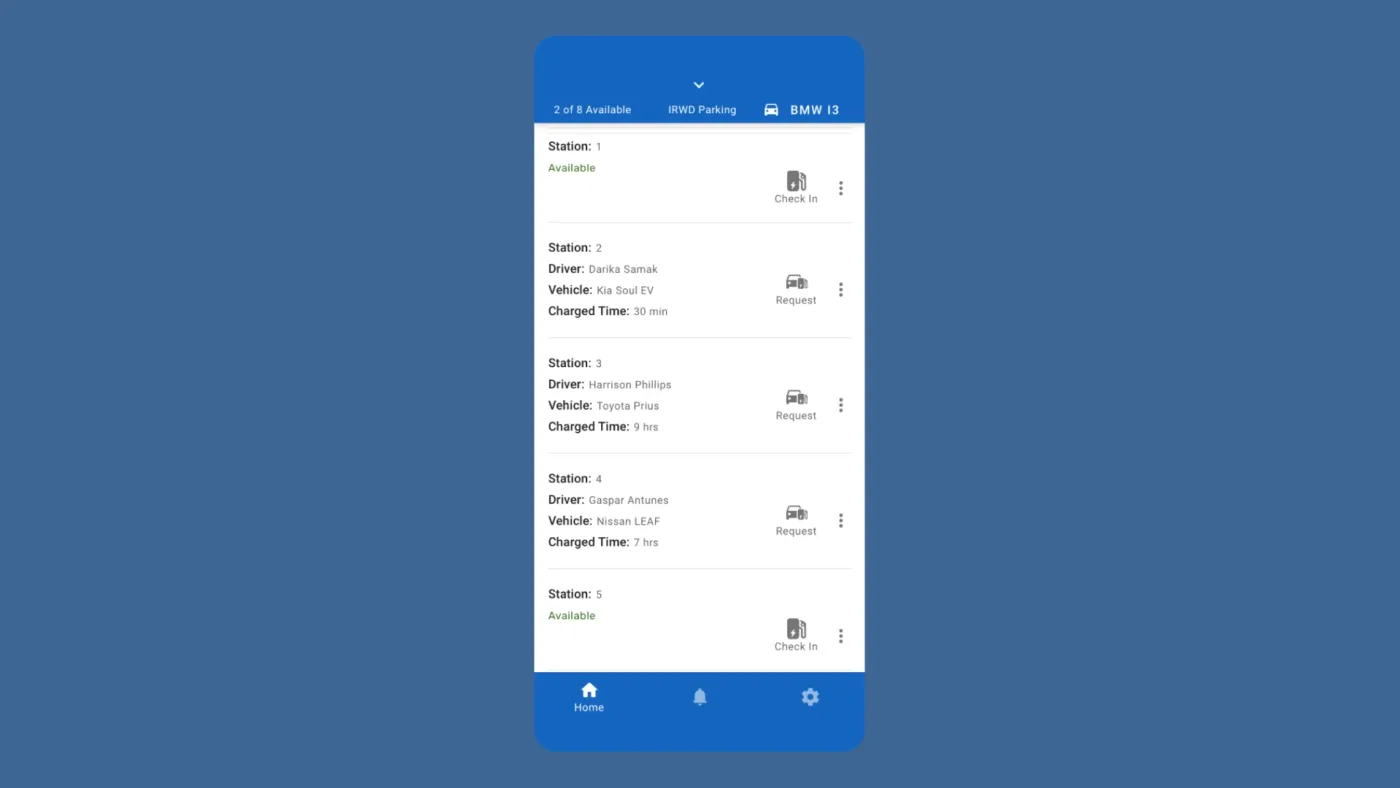
IRWD EV Charging Information and Status
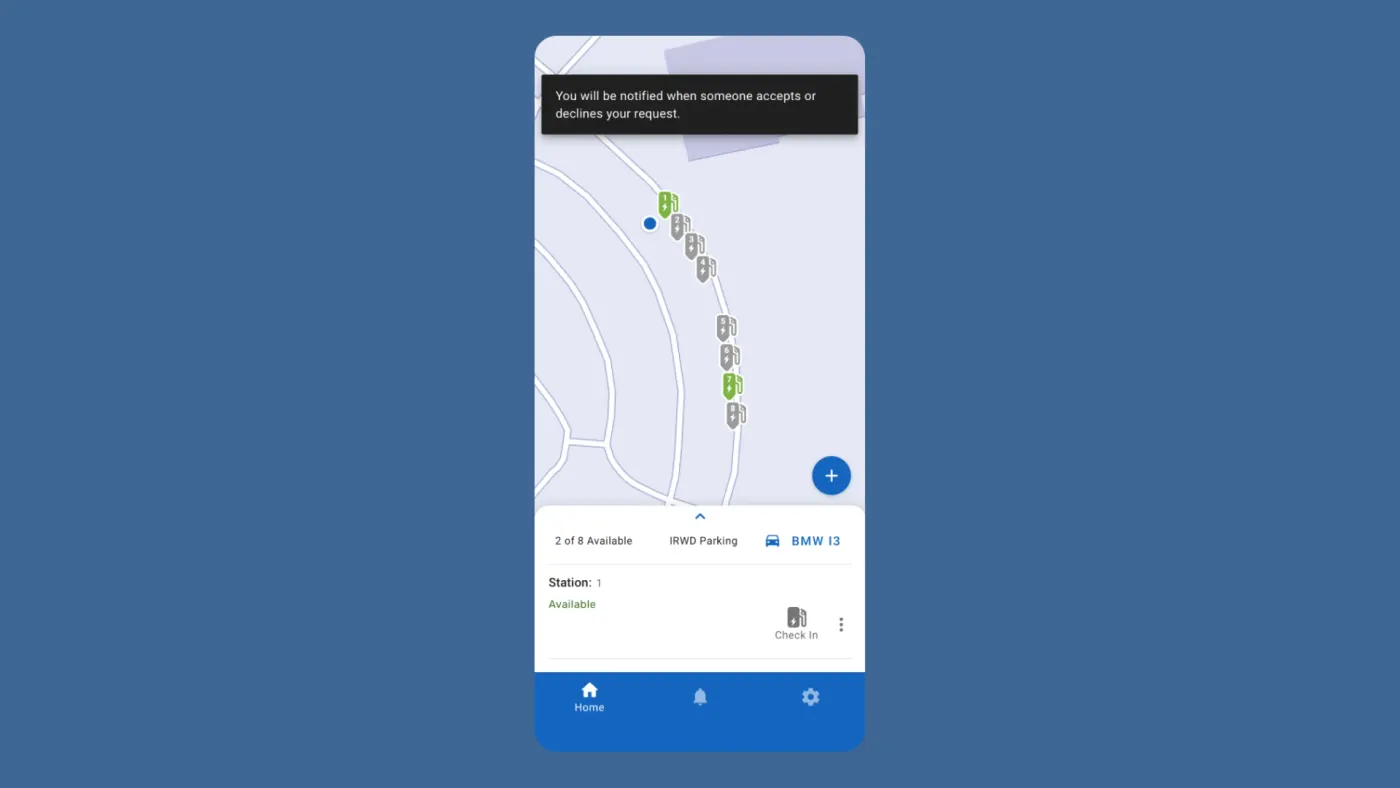
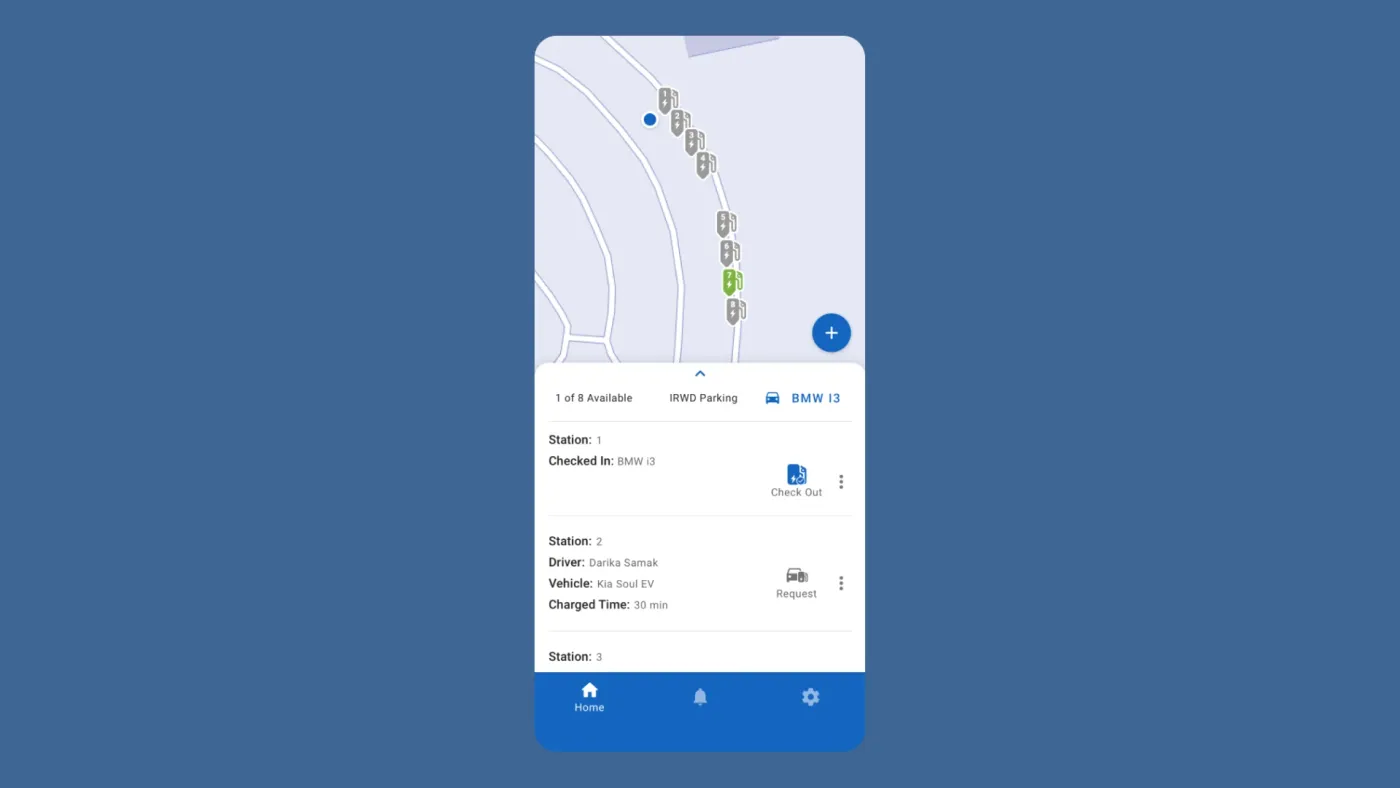
I prototyped the EV charging information and status interaction to provide drivers with access to EV charging information, including who is using the chargers and for how long. The system also updates drivers about strangers parking at an EV station and any broken chargers. The video demonstrates how drivers can swipe the bottom card up to get more information (timestamp 0:01-0:08) and shows the main screen with all EV chargers and their respective statuses (timestamp 0:08).
Slide 1 of 4
Usability Testing
Tested the 4 main systems with 6 representative users and identified positive and negative user insights that led to improvements.
After creating prototypes, I conducted a usability test to evaluate the 4 main systems with 6 representative users. During the test, participants attempted to complete tasks while I observed, listened, and took notes. The primary goal of the case study was to determine if the crowdsourced systems would assist IRWD EV drivers in enhancing EV charging communication and coordination. Additional UX and feature interaction goals included:
- EV Charger Check-in and Check-out: Assessing participants' ability to check in and check out of an EV charger and identifying areas for improving efficiency in check-in processes.
- Requesting EV Parking: Evaluating participants' capability to locate and request EV parking from drivers currently charging their vehicles.
- Navigating EV Charging Information: Testing their proficiency in navigating the screen to find EV charging information and availability, and evaluating the effectiveness of the displayed information.
- Reporting Functionality: Observing how users utilized the report function to report issues with broken EV charging stations and gather insights into the strengths and weaknesses of the report system.
Usability Test Summary
During the usability tests, I gathered insights and observations for each task performed by the participants. While most users completed their tasks, some encountered difficulties, confusion, or took longer than expected. These instances were flagged as negative experiences and documented for future improvements.
Findings
EV Check-in and Check-out
- 5 out of 6 participants completed the task successfully, but 3 reported negative feedback. Users were confused by the blue color indicating the available status of the charging station, mistakenly thinking it indicated occupancy.
EV Charging Request
- All 6 participants completed the task, but 3 reported negative feedback. The issues stemmed from inefficiencies in completing the task within a reasonable time frame. Some users initially struggled with navigating the EV charger map markers before figuring out how to send an EV station request. Participants suggested simplifying or automating the process. Additionally, there was a desire for a messaging feature to provide context when requesting an EV charger.
EV Charger Reporting
- 4 out of 6 participants completed the task, and 2 reported negative feedback. While most feedback was positive, users found one of the EV charging reporting options confusing and expressed uncertainty about which option to choose.
EV Charging Information and Status
- All 6 participants completed the task successfully, with 1 reporting negative feedback. Most users found the information helpful and easily accessible. However, some users wanted more detailed information about their EV charging status.
Improvements
In response to issues identified during user testing, several key changes were implemented in the high-fidelity designs:
Addressing EV Charging Availability Confusion
Changed EV Markers to Green: The color of EV markers was changed from blue to green to indicate unoccupied EV chargers, aligning with the color's association with availability and clarity.
- Old Design: The blue color was used to indicate un-occupied EV chargers, causing confusion.
- New Design: The green color was used instead to indicate available EV chargers, reducing confusion.
Slide 1 of 3
Challenges
One major challenge and flaw that I encountered was the inability to test the consistency of drivers using the crowdsourced systems over an extended period using current prototyping tools. Ideally, a 1-2 week test period would provide insights into user consistency and usage patterns. This data is crucial for ensuring the effectiveness of the crowdsourced systems, as it relies on users updating their status. Without consistent usage, there is a risk of confusion, frustration, and misinformation in the EV charging process. To address this challenge and gather analytical data on feature consistency, a more advanced prototype would be required. This prototype needs to track user usage data and interactions, providing insights into how often users utilize each feature and whether they consistently check in and out. Such data would inform further improvements and optimizations to enhance the overall user experience of EV charging coordination.
Conclusion
One of the project's main goals was to answer the questions and assumptions of the research study based on the problem statement. Thanks to the development of the 4 main systems for solving EV charging-related hurdles for IRWD employees, All research questions and assumptions were accounted for. While I did address user issues, it's worth mentioning that I had to make a lot of compromises that may negatively impact the UX of EV charging. The fact that I could not use an API as a method of communicating with the EV chargers meant that I had to settle for creating crowdsourced solutions which require manual input from the user, this makes the process error-prone, tedious, and manually intensive thus negatively impacting the UX of using the IRWD EV charging app. While the user test proved to show promising results and feedback it left me wondering if users would use the app to update their status consistently or will they find the UX frustrating, forgetting to update their charging status and making the whole experience inconvenient for everyone. To truly know the impact of the crowdsourced EV charging systems, I would need to test a technical working version of the product for a longer period and test for consistency, error-prone tasks, and tedious interactions to get tangible metrics. It is also worth mentioning that the best solution to the problem statement is not to build an EV charging app for IRWD employees but to simply allocate the budget for constructing more EV charging stations at the IRWD campus to accommodate the growing ownership of EVs.